

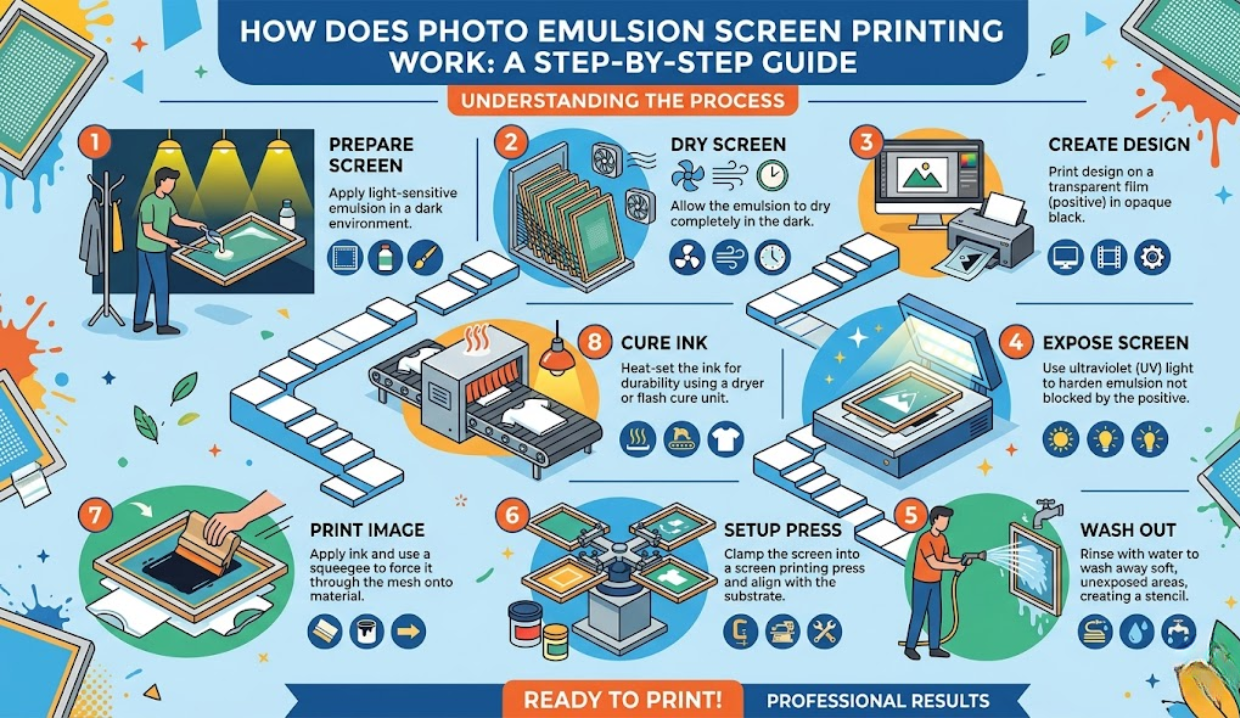
Photo emulsion screen printing is the foundation of clean, detailed, and repeatable prints. Yet many beginners struggle with washed-out designs, blurry edges, or broken stencils. Even experienced printers encounter issues such as pinholes, uneven coating, or exposure failures.
This guide breaks everything down—from choosing the right emulsion to mastering exposure and troubleshooting real-world problems. Whether you’re printing simple logos or high-detail halftones, you’ll learn how to control every variable and get consistent results.
Understanding Photo Emulsion in Screen Printing
Photo emulsion is a light-sensitive liquid applied to a mesh screen that hardens when exposed to UV light, creating a stencil for printing. The unexposed areas wash out, allowing ink to pass through.
Types of Emulsions
Each type behaves differently based on exposure, durability, and detail:
| Fast exposure, great detail | Key Features | Best Use Case |
|---|---|---|
| Diazo emulsion | Longer exposure time, forgiving | Beginners, general printing |
| Dual cure emulsion | Balanced durability and detail | Versatile printing setups |
| Photopolymer emulsion | Fast exposure, high detail | Fine lines, halftones |
- Diazo sensitizer must be mixed before use.
- Dual-cure emulsion exposure timing offers flexibility.
- Photopolymer screen emulsion properties support high-resolution stencil work.
Screen Preparation Before Emulsion Coating
Skipping proper prep leads to poor adhesion and stencil failure.
Degreasing and Mesh Readiness
Before coating, use a degreaser solution to remove oils and dust. This ensures proper emulsion adhesion.
- Clean both sides of the mesh
- Rinse thoroughly
- Let the screen dry completely
Mesh Count and Tension Impact
- Lower mesh (110) = thicker ink deposit
- Higher mesh (230) = fine detail
Mesh tension impact on emulsion affects coating smoothness and stencil durability. A loose screen leads to uneven coating streaks and poor edge definition.
Also read: How Does thunderonthegulf.com Policy Protect Your Data Rights?
How to Coat a Screen with Emulsion
The emulsion scoop coater technique determines stencil quality.
Step-by-Step Coating Process
- Place the screen vertically
- Fill the scoop coater evenly
- Apply from bottom to top
- Use consistent pressure
- Coat both sides if needed
Controlling Emulsion Thickness
- Use a multi-coat emulsion application for durability
- Thickness affects stencil resolution in halftone printing
- Measure the emulsion thickness in microns to control for precision
Common Coating Mistakes
- Uneven coating streak root causes: inconsistent speed
- Micro-bubble formation in emulsion coating
- Overcoating leading to long exposure times
Drying Photo Emulsion the Right Way
Drying is often overlooked but critical.
Ideal Conditions
- Temperature: 30–40°C
- Low humidity (use a humidity meter (hygrometer))
- Complete darkness or a yellow safelight bulb
Emulsion drying conditions,, humidity directly affects curing. High humidity can cause stencil collapse or tackiness.
Air Drying vs Forced Drying
- Air drying: slower, more consistent
- Drying cabinet: faster but requires control
Avoid dust and airflow contamination.
Exposure Process Explained
Exposure is where the stencil is formed.
UV Light and Exposure Units
Use a UV exposure unit calibrated for your setup. Incorrect settings lead to:
- Underexposed vs overexposed emulsion
- Loss of detail or full stencil washout
How to Calculate Exposure Time
Factors include:
- Emulsion type
- Mesh count
- Coating thickness
- Light intensity
Use an exposure calculator tool or perform a step wedge exposure test.
Step Wedge Testing Method
This test helps dial in perfect exposure:
- Place the step wedge on the coated screen
- Exposure to UV light
- Wash out
- Analyze detail retention
This ensures consistent stencil sharpness and edge definition.
Washout and Stencil Development
After exposure, wash out the design carefully.
Water Pressure Techniques
- Start with low pressure
- Increase gradually
- Use a pressure washer (screen washout) if needed
Screen washout pressure control prevents stencil damage.
Identifying Proper Exposure
- Clean edges
- No slimy residue
- Design holds firm
Problems like emulsion washing out completely indicate underexposure.
Troubleshooting Emulsion Problems
Underexposure vs Overexposure
| Issue | Cause | Fix |
|---|---|---|
| Emulsion washes out | Underexposed | Increase exposure time |
| Design won’t wash out | Overexposed | Reduce exposure |
Pinhole and Stencil Breakdown Fixes
- Screen pinhole prevention methods include clean coating and dust control
- Use blockout for corrections
Adhesion and Washout Failures
Common causes:
- Poor degreasing
- High humidity
- Incorrect sensitizer ratio
The emulsion sensitizer mixing ratio must be accurate to avoid failure.
Advanced Techniques for Better Prints
Halftone Detail Optimization
- Use high mesh counts
- Control exposure precisely
- Avoid the mesh shadowing effect on exposure
Multi-Coating for Durability
- Improves the water resistance of the cured emulsion
- Supports long print runs
Water-Based vs Plastisol Ink
- Water-based ink interaction can cause stencil swelling
- Plastisol ink compatibility offers longer stencil life
Reclaiming and Reusing Screens
Emulsion Removal Process
Use an emulsion remover (stripper):
- Apply evenly
- ‘Let’s sit briefly
- Pressure wash
This completes the emulsion reclaiming chemical process.
Preventing Ghost Images
- Use proper reclaiming techniques
- Clean thoroughly to avoid image residue
Capillary Film vs Liquid Emulsion
| Feature | Capillary Film | Liquid Emulsion |
|---|---|---|
| Consistency | High | Variable |
| Ease of use | Moderate | Easy |
| Detail | Excellent | Good |
| Cost | Higher | Lower |
Capillary film vs liquid emulsion depends on precision needs and budget.
Environmental and Hidden Factors Most Printers Miss
- Emulsion light contamination risks from ambient light
- Hard water is affecting the washout results
- Emulsion cracking after drying due to rapid drying
- Stencil fatigue over multiple print cycles
- Coating speed vs thickness consistency
Even factors like LED exposure units can affect results due to the emulsion’s sensitivity to them.
Storage and Handling Best Practices
- Store emulsion in cool, dark conditions
- Monitor emulsion shelf life storage conditions
- Avoid expired emulsions
Pre-coated screens offer convenience but may reduce flexibility compared to manual coating.
Real-World Use Case
A printer working with detailed artwork noticed blurry halftones. The issue wasn’t the design—it was improper exposure and thick coating.
After adjusting:
- Reduced emulsion thickness
- Performed step wedge testing
- Controlled humidity
The result was sharp, clean prints with improved consistency.
FAQS: Photo Emulsion Screen Printing
How long should the photo emulsion dry before exposure?
Typically, 12–24 hours depending on humidity and airflow. Faster drying setups can reduce time, but complete dryness is critical.
What happens if the screen emulsion is underexposed?
The stencil breaks down during washout, leading to lost details or complete failure.
Why are there pinholes in my emulsion stencil?
Dust, improper coating, or air bubbles often cause pinholes.
Can photo emulsion expire?
Yes. Old emulsion loses sensitivity and may not expose correctly.
What light is safe for coating emulsion?
Use a yellow safelight to avoid premature exposure.
Final Takeaways for Perfect Emulsion Results
- Always start with proper screen preparation
- Control coating thickness and drying conditions
- Use exposure testing instead of guessing
- Monitor humidity and environmental factors
- Troubleshoot systematically, not randomly
Mastering photo emulsion screen printing is about control, not luck. Once you understand how each variable interacts—from mesh count to exposure timing—you can produce consistent, high-quality prints every time.
